


For the next assignment (this will count as your final exam project) you will be designing a newspaper ad for a real business. If your ad is chosen, it will run in the Watertown Daily Times. You are competing with other students in Jefferson and Dodge county to create the best ad.
Here are some resources to help you get started:
The Design Process of a Creative Newspaper Advertisement
How to Design and Effective Newspaper Advertisement
Tips for Newspaper Ad Design
Best Practices for Creating Newspaper Ads
How to Layout a Newspaper Ad
Showing posts with label Assignments. Show all posts
Showing posts with label Assignments. Show all posts
Cruise Simulation
This assignment will be the longest and also worth the most points (200 total). You will have a total of two weeks to complete it. A couple of tips that I can give you to do the best on this assignment is to first of all include the logo on EVERYTHING you do. The logo needs to be designed in Illustrator so that you can easily resize it in the other programs. All of the other assignments will be created in InDesign, with the exception of the door hangers and scratch off card, those will need to be done in Photoshop. Next, make sure you follow the rubric at the bottom of the page. This is what I will be grading you off of.
To post for grading: Create a new post called "Cruise Simulation." You will then upload each assignment to this post AS YOU FINISH IT. To modify a post so that you can upload your new document to it, go to the Blogger dashboard and click edit posts. Then just continue adding on to your Cruise Simulation post.
The assignment and rubric are here. If that file does not work, I also have it saved in my shared folder under Desktop Publishing called Cruise Simulation.
To post for grading: Create a new post called "Cruise Simulation." You will then upload each assignment to this post AS YOU FINISH IT. To modify a post so that you can upload your new document to it, go to the Blogger dashboard and click edit posts. Then just continue adding on to your Cruise Simulation post.
The assignment and rubric are here. If that file does not work, I also have it saved in my shared folder under Desktop Publishing called Cruise Simulation.

Illustrator Tutorials
Adobe Illustrator is really the backbone to all design project. It allows you to create vector based images, in which you cannot do in Photoshop. In essence, what vector based images do, is allow you to make them larger or smaller, without the fear of pixelization. From here on out, we will be using Illustrator to design major elements of our projects, particularly logos.
In order to be able to use illustrator to its fullest, I need you to learn some of the basics. The best way to do this is through some tutorials. The first tutorial I would like you to do is your choice. Just search for Illustrator Tutorials in Google, and you will get some excellent results. Pick something that looks fun, but is also challenging enough to the point in which you will learn something. I personally like the site Tutorialized.
The second tutorial will be again your choice, but it has to be a tutorial of creating a logo. There are many out there ranging from political logos to businesses. When you post these on your blog, paste a link to the tutorial that you did so I can compare your work to the original.
In order to be able to use illustrator to its fullest, I need you to learn some of the basics. The best way to do this is through some tutorials. The first tutorial I would like you to do is your choice. Just search for Illustrator Tutorials in Google, and you will get some excellent results. Pick something that looks fun, but is also challenging enough to the point in which you will learn something. I personally like the site Tutorialized.
The second tutorial will be again your choice, but it has to be a tutorial of creating a logo. There are many out there ranging from political logos to businesses. When you post these on your blog, paste a link to the tutorial that you did so I can compare your work to the original.
Magazine Article
Create an article for the inside of the magazine you designed your cover for. Your article should be about one of your feature topics from the cover. Elements that it must include:
All paragraph formatting options are done with the paragraph window.
Pull Quote: A quote from the article that is "pulled Out" to make it stand out. The font is larger and it is separated from the rest of the paragraph.

Drop Cap: It is a capital letter at the beginning of a sentence that takes up multiple lines. (Mother Goose Stories)

Formatting Text:
Leading: The term to describe the vertical space between lines of text.

Baseline: The invisible line that text sits on.
Kerning: The space between characters (not words)
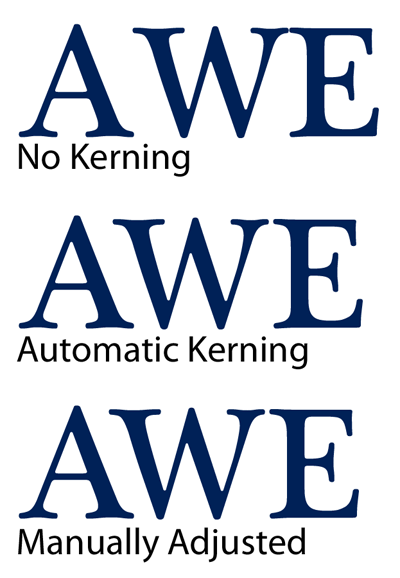
Tracking: The act of applying a kerning style to an entire document.
- Must be created in InDesign
- Must use a drop cap
- Justified alignement with last line left aligned
- Wrap image within the text
- Use a pull out quote
- Use correct kerning
All paragraph formatting options are done with the paragraph window.
Pull Quote: A quote from the article that is "pulled Out" to make it stand out. The font is larger and it is separated from the rest of the paragraph.
Drop Cap: It is a capital letter at the beginning of a sentence that takes up multiple lines. (Mother Goose Stories)
Formatting Text:
Leading: The term to describe the vertical space between lines of text.
Baseline: The invisible line that text sits on.
Kerning: The space between characters (not words)
Tracking: The act of applying a kerning style to an entire document.
Create your Own Magazine Cover
Using Adobe InDesign, create your own magazine cover. Look at samples online, but do not copy from them. The design needs to be completly your own.
Required elements: UPC code, Title, Graphics, Distribution Date, Volume/Issue, Inside Articles
Student Samples:
![]()
![]()
Required elements: UPC code, Title, Graphics, Distribution Date, Volume/Issue, Inside Articles
Student Samples:


Current Science - Magazine Copy
Using the magazine I gave you in class, copy the cover as closely as possible. Use the same dimensions, same colors, similar graphics, and similar font.
Example of final product:
![]()
Example of final product:

Business Cards
Using InDesign, create 3 business cards for any company of your choice. You should include the company logo as well as the following information: Name, Position Title, Address, Phone, Email, Web Address, and Fax
Samples:
![]()
![]()
Samples:


Wanted Poster
Using the tutorial from the shared folder, complete a Wanted Poster. An example is below:


Shutterfly Announcement
Go to http://www.shutterfly.com/ and view the baby or wedding announcements. Using Photoshop, try to duplicate a design as close as possible. You cannot copy/paste anything, you have to create it all by hand.
Subscribe to:
Posts (Atom)


